
Microlink adblock now dismisses cookie banners automatically
February 16, 2026
When adblock is enabled, the Microlink API now handles cookie consent banners automatically, on top of blocking ads and trackers. Adblock is on by default, so every request gets it without a code change.
TL;DR
- When adblock is enabled, the Microlink API now handles cookie consent banners automatically, on top of blocking ads and trackers.
- Adblock is on by default, so every request gets it without a code change.
- For common cases, that replaces a custom Puppeteer script.
- Inside browserless, three layers do the work: ad and tracker blocking, autoconsent-based opt-out, and cosmetic prehide rules.
- Set
adblock=falsewhen your workflow needs to load ads and trackers, or when you are validating the site's default consent UX.
A consent popup is the usual reason a screenshot, PDF, or metadata request comes back wrong: the page loads, and the banner covers the content. The upgrade runs inside browserless, our own headless browser runner behind the Microlink API.
One parameter blocks trackers and consent popups
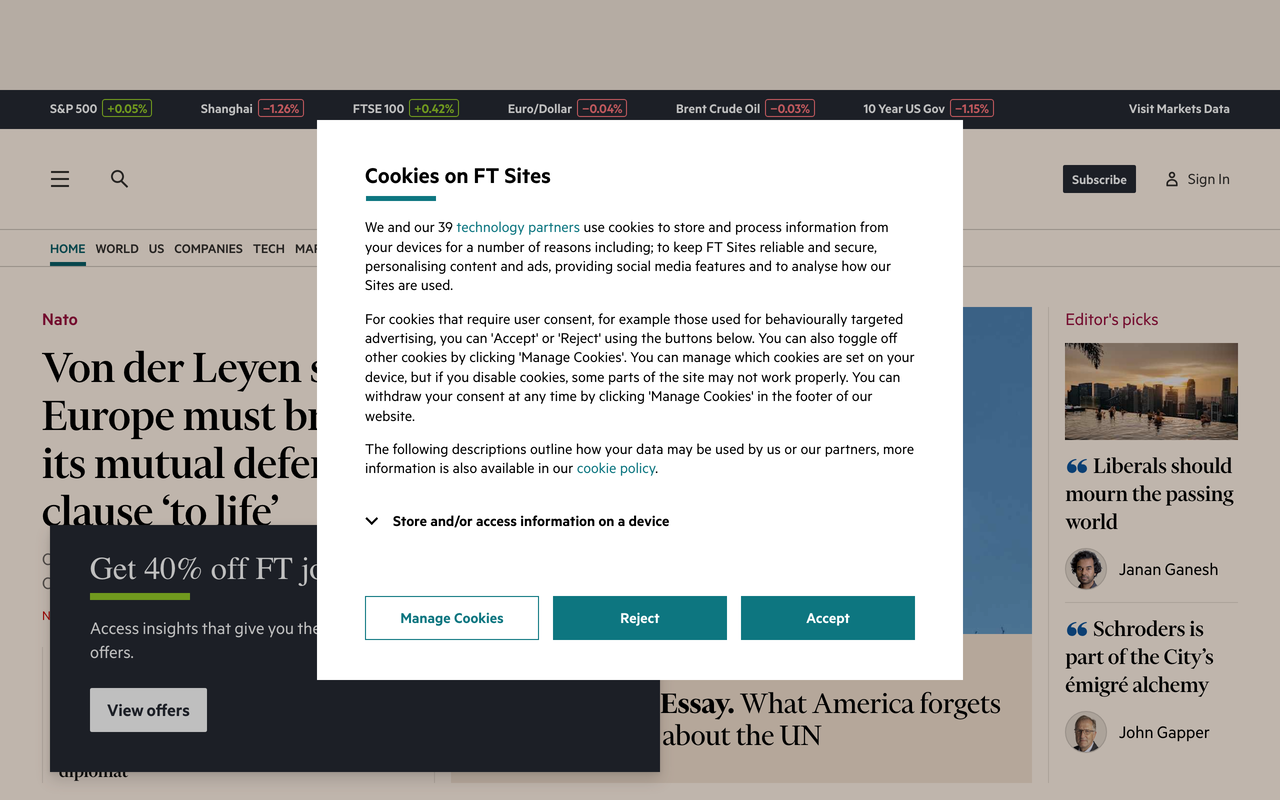

The same request with adblock disabled and enabled
With this release,
adblock covers two jobs:- Request blocking: ad and tracker requests are blocked before they load.
- Consent handling: cookie banners from supported CMPs (consent management platforms) are dismissed automatically.
For common cases, that replaces a custom Puppeteer script.
Until now, hiding a cookie banner meant site-specific work: hardcoded selectors per site, generic "click accept" scripts, filter lists, CMP-specific logic, or browser extensions. Each one breaks as soon as the target URL's markup changes.
The API now detects the common cookie banner cases itself. You stop writing domain-specific one-offs, and the rest of your request flow (the
url, screenshot, and other parameters) stays the same.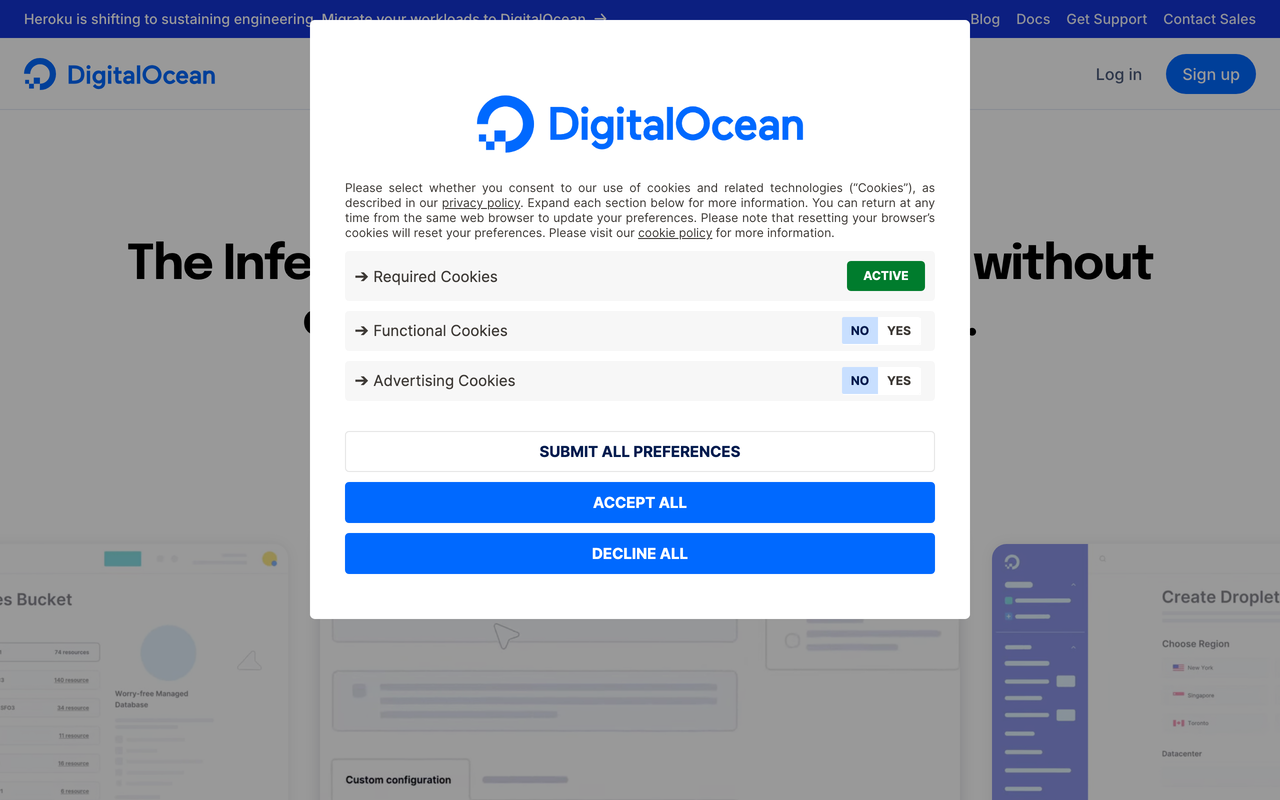
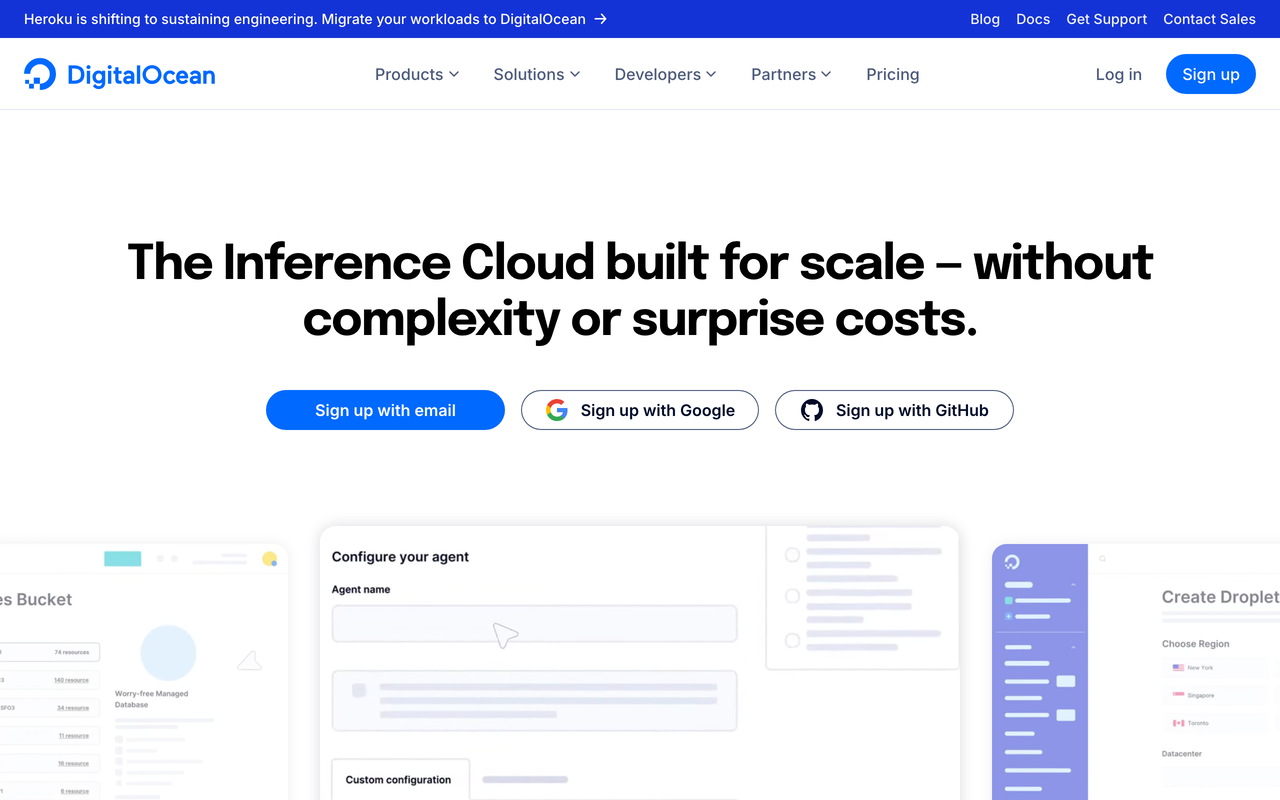
The same request with adblock disabled and enabled
For complicated or corner cases, the existing query parameters still work, and you should need them less often than before: click to interact with selectors, styles to inject CSS overrides, scripts to inject JavaScript, modules to load module-based logic, and waitForSelector to wait for a stable state before capture.
How browserless removes the banner
For broader context on the runner itself, see what is a headless browser?. Inside browserless, @browserless/goto now combines three layers:
- Blocking: an ad and tracker engine for abusive third-party requests, powered by ghostery/adblocker.
- Opt-out: autoconsent-based cookie handling, configured for automatic opt-out and powered by DuckDuckGo’s autoconsent.
- Prehide: cosmetic rules that reduce visual cookie overlays before capture.
No configuration, and adblock=false to opt out
The adblock capabilities are enabled by default, so there is nothing to configure. A screenshot of
https://www.nytimes.com/ with adblock: true looks like this:The following examples show how to use the Microlink API with CLI, cURL, JavaScript, Python, Ruby, PHP & Golang, targeting 'https://www.nytimes.com/' URL with 'screenshot' & 'adblock' API parameters:
CLI Microlink API example
microlink https://www.nytimes.com/&screenshot&adblockcURL Microlink API example
curl -G "https://api.microlink.io" \
  -d "url=https://www.nytimes.com/" \
  -d "screenshot=true" \
  -d "adblock=true"
JavaScript Microlink API example
import createClient from 'microlink.io'

const microlink = createClient()

const data = await microlink.screenshot('https://www.nytimes.com/', {
  adblock: true
})
Python Microlink API example
import requests

url = "https://api.microlink.io/"

querystring = {
    "url": "https://www.nytimes.com/",
    "screenshot": "true",
    "adblock": "true"
}

response = requests.get(url, params=querystring)

print(response.json())
Ruby Microlink API example
require 'uri'
require 'net/http'

base_url = "https://api.microlink.io/"

params = {
  url: "https://www.nytimes.com/",
  screenshot: "true",
  adblock: "true"
}

uri = URI(base_url)
uri.query = URI.encode_www_form(params)

http = Net::HTTP.new(uri.host, uri.port)
http.use_ssl = true

request = Net::HTTP::Get.new(uri)
response = http.request(request)

puts response.body
PHP Microlink API example
<?php

$baseUrl = "https://api.microlink.io/";

$params = [
    "url" => "https://www.nytimes.com/",
    "screenshot" => "true",
    "adblock" => "true"
];

$query = http_build_query($params);
$url = $baseUrl . '?' . $query;

$curl = curl_init();

curl_setopt_array($curl, [
    CURLOPT_URL => $url,
    CURLOPT_RETURNTRANSFER => true,
    CURLOPT_ENCODING => "",
    CURLOPT_MAXREDIRS => 10,
    CURLOPT_TIMEOUT => 30,
    CURLOPT_HTTP_VERSION => CURL_HTTP_VERSION_1_1,
    CURLOPT_CUSTOMREQUEST => "GET"
]);

$response = curl_exec($curl);
$err = curl_error($curl);

curl_close($curl);

if ($err) {
    echo "cURL Error #: " . $err;
} else {
    echo $response;
}
Golang Microlink API example
package main

import (
    "fmt"
    "net/http"
    "net/url"
    "io"
)

func main() {
    baseURL := "https://api.microlink.io"

    u, err := url.Parse(baseURL)
    if err != nil {
        panic(err)
    }
    q := u.Query()
    q.Set("url", "https://www.nytimes.com/")
    q.Set("screenshot", "true")
    q.Set("adblock", "true")
    u.RawQuery = q.Encode()

    req, err := http.NewRequest("GET", u.String(), nil)
    if err != nil {
        panic(err)
    }

    client := &http.Client{}
    resp, err := client.Do(req)
    if err != nil {
        panic(err)
    }
    defer resp.Body.Close()

    body, err := io.ReadAll(resp.Body)
    if err != nil {
        panic(err)
    }

    fmt.Println(string(body))
}
import createClient from 'microlink.io'
const microlink = createClient()
const data = await microlink.screenshot('https://www.nytimes.com/', {
adblock: true
})No cookie-banner strategy is perfect for every page on the internet. Set adblock=false when your workflow needs to load ads and trackers, or when you are validating the site's default consent UX:
The following examples show how to use the Microlink API with CLI, cURL, JavaScript, Python, Ruby, PHP & Golang, targeting 'https://www.nytimes.com/' URL with 'adblock' API parameter:
CLI Microlink API example
microlink https://www.nytimes.com/cURL Microlink API example
curl -G "https://api.microlink.io" \
  -d "url=https://www.nytimes.com/" \
  -d "adblock=false"
JavaScript Microlink API example
import createClient from 'microlink.io'

const microlink = createClient()

const data = await microlink.metadata('https://www.nytimes.com/', {
  adblock: false
})
Python Microlink API example
import requests

url = "https://api.microlink.io/"

querystring = {
    "url": "https://www.nytimes.com/",
    "adblock": "false"
}

response = requests.get(url, params=querystring)

print(response.json())
Ruby Microlink API example
require 'uri'
require 'net/http'

base_url = "https://api.microlink.io/"

params = {
  url: "https://www.nytimes.com/",
  adblock: "false"
}

uri = URI(base_url)
uri.query = URI.encode_www_form(params)

http = Net::HTTP.new(uri.host, uri.port)
http.use_ssl = true

request = Net::HTTP::Get.new(uri)
response = http.request(request)

puts response.body
PHP Microlink API example
<?php

$baseUrl = "https://api.microlink.io/";

$params = [
    "url" => "https://www.nytimes.com/",
    "adblock" => "false"
];

$query = http_build_query($params);
$url = $baseUrl . '?' . $query;

$curl = curl_init();

curl_setopt_array($curl, [
    CURLOPT_URL => $url,
    CURLOPT_RETURNTRANSFER => true,
    CURLOPT_ENCODING => "",
    CURLOPT_MAXREDIRS => 10,
    CURLOPT_TIMEOUT => 30,
    CURLOPT_HTTP_VERSION => CURL_HTTP_VERSION_1_1,
    CURLOPT_CUSTOMREQUEST => "GET"
]);

$response = curl_exec($curl);
$err = curl_error($curl);

curl_close($curl);

if ($err) {
    echo "cURL Error #: " . $err;
} else {
    echo $response;
}
Golang Microlink API example
package main

import (
    "fmt"
    "net/http"
    "net/url"
    "io"
)

func main() {
    baseURL := "https://api.microlink.io"

    u, err := url.Parse(baseURL)
    if err != nil {
        panic(err)
    }
    q := u.Query()
    q.Set("url", "https://www.nytimes.com/")
    q.Set("adblock", "false")
    u.RawQuery = q.Encode()

    req, err := http.NewRequest("GET", u.String(), nil)
    if err != nil {
        panic(err)
    }

    client := &http.Client{}
    resp, err := client.Do(req)
    if err != nil {
        panic(err)
    }
    defer resp.Body.Close()

    body, err := io.ReadAll(resp.Body)
    if err != nil {
        panic(err)
    }

    fmt.Println(string(body))
}
import createClient from 'microlink.io'
const microlink = createClient()
const data = await microlink.metadata('https://www.nytimes.com/', {
adblock: false
})Try it on the New York Times
Run the first snippet above against
https://www.nytimes.com/, then the same URL with adblock: false, and compare the two screenshots. For the rest of the stack behind that request, read Microlink API: Browser automation, Antibot detection at scale, and Microlink Proxy: How it works.Join the community
All of these improvements or features are community driven: We listen to your feedback and act accordingly.
Whether you are building a product, an indie developer, or just interested in web technologies, come chat with us.